
Boost.space AgentOS Lifetime Deal
Automate routine business work so your team spends less time on follow-ups and daily admin work

Get live meeting coaching, transcripts and summaries that never leave your Mac or need a bot
Disclosure: SAASTOOLY may earn an affiliate commission from qualifying purchases, at no extra cost to you. Deal terms can change, so the current AppSumo listing is authoritative.
AI notetakers have become another line on the software bill. Most of them send a bot into your calls, upload the audio to the cloud and charge every month or every year for the privilege.
The AppSumo listing names Granola, Otter.ai and Fathom as alternatives, and compares the deal against Granola at $168 a year. MeetMouse costs $12 once. It records nothing to a server: transcription and the AI model run on your Mac. If you take a handful of client or sales calls a week and only need notes, summaries and a nudge when you talk too much, that is one subscription you can drop.
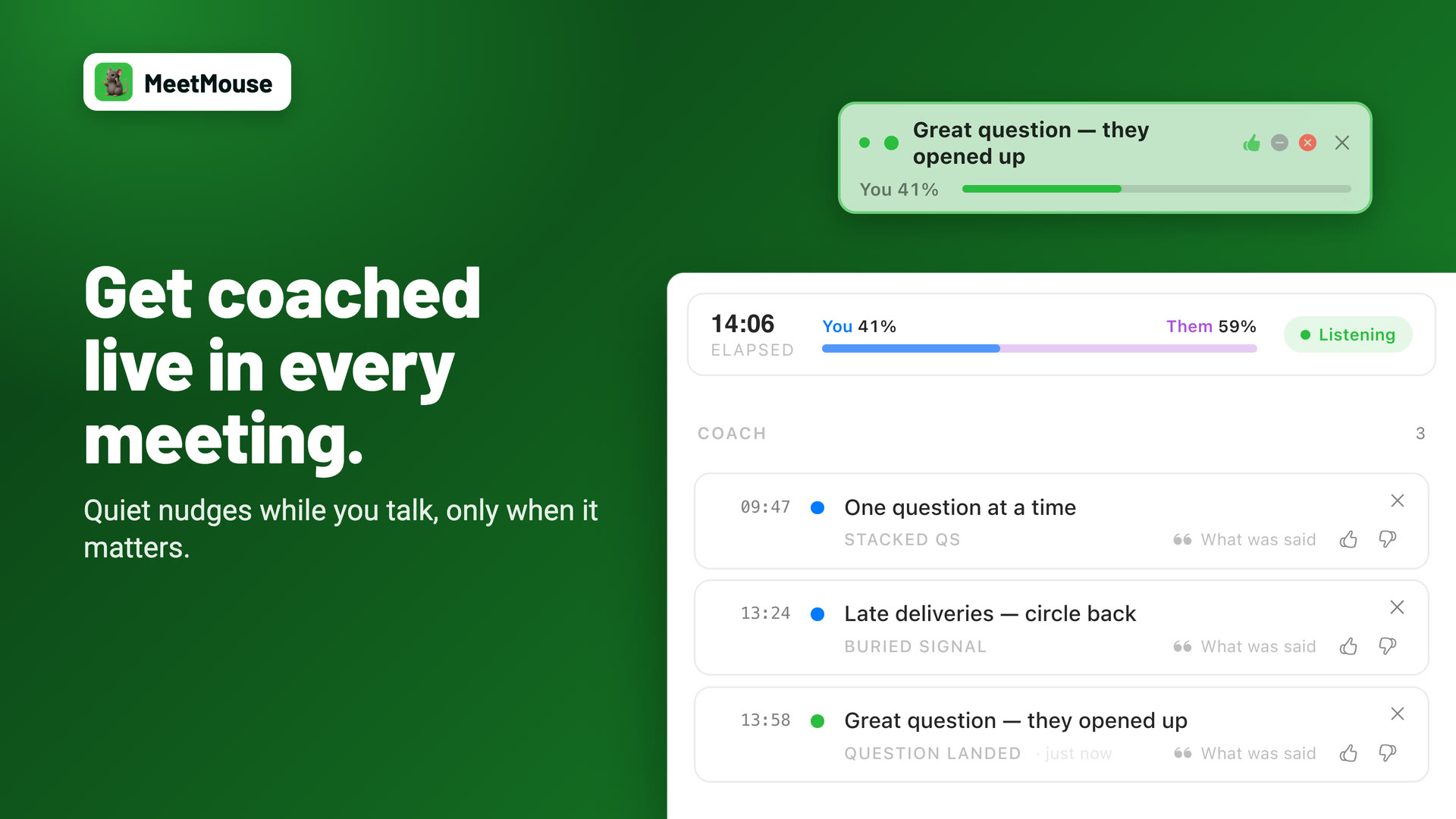
MeetMouse, formerly called Meeting Coach, is a Mac app that listens to your calls, writes a timestamped transcript as you talk, and gives you a summary, key takeaways and next steps when the meeting ends. While the call is running, it shows coaching cues in a small overlay, such as a hint that you are interrupting or have not reflected back what the other person said.
Everything runs locally. The listing states that audio and text never leave your Mac, that the only network request is a one-time model download, and that it works with WiFi off and without an account. There is no bot joining the call.
This is an AppSumo Originals product, built by AppSumo itself, and the founder updates on the listing come from AppSumo's Noah Kagan. The listing shows it founded in May 2026 in Austin, Texas, as a bootstrapped team of 1 to 10.
One-time price: $12 for one code.
Retail comparison shown: The listing compares it with Granola at $168 a year. No separate retail price is shown for MeetMouse.
Alternatives named: Granola, Otter.ai and Fathom.
Works with: Zoom, Google Meet and Slack, according to the listing.
System requirements: macOS 14.2 or later on Apple Silicon, with 16GB of RAM recommended. It does not work on Intel Macs.
Access and updates: Lifetime access with all future plan updates.
Refund window: The AppSumo listing shows a 60-day money-back guarantee.
Codes and stacking: One code, and the deal is not stackable.
Redemption deadline: Redeem your code within 60 days of purchase.
Against a $168 yearly notetaker plan, the $12 price is recovered in the first month, which is an excellent result by any measure. Even if you only use it for a few calls a month, the price is lower than a single month of most paid plans.
The real question is not the money. It is whether a local app on one Mac can replace a cloud tool you may share with a team. Our comparison of lifetime deals and subscriptions helps you weigh that.
Every call gets an on-device transcript with timestamps, in 25 languages. For consultants and anyone handling client information, keeping recordings off third-party servers removes a question you would otherwise need to answer for each tool you use.
When the meeting ends, MeetMouse writes a summary, the key takeaways and the next steps. A review screen also suggests a focus for your next meeting. This is the part most people pay a notetaker for.
The coaching cues appear mid-meeting. The founder describes it as catching patterns such as talking again, reopening a closed point or not reflecting back what someone said. The listing describes the overlay as discreet and safe during screen sharing, and a progress dashboard tracks streaks, weekly stats and your most common patterns.
Saved meetings are searchable, and you can ask the built-in AI a question about any of them. Answers link back to timestamps in the transcript.
An MCP server is included, so you can connect your meeting data to other AI tools you already use.
| Plan | One-time price | Codes |
|---|---|---|
| 1 Code | $12 | 1 |
There is a single plan with every listed feature. The deal is not stackable, so buying more than one code adds nothing, as explained in our guide to AppSumo codes and stacking. The only limit that matters is your hardware: an Apple Silicon Mac on macOS 14.2 or later, ideally with 16GB of RAM.
Mac only, and Apple Silicon only. Windows users and Intel Macs are out. The founder says a Windows version is what he is working on next, so treat that as a plan, not a feature.
It lives on one computer. Notes stay on your Mac, which is the point. Teams that want shared meeting libraries and cloud access from any device are better served by a cloud notetaker.
Speaker labels are not perfect. The review summary on the listing mentions occasional confusion in speaker identification.
Run these checks alongside our checklist of factors to verify before buying a lifetime deal:
Who it suits
Who should look elsewhere
At $12, MeetMouse is close to an automatic buy for anyone on a recent Mac who takes regular calls. It covers what most people use a notetaker for, adds live coaching during the call, and keeps everything on your own machine. Because it is an AppSumo Originals product, the maker is AppSumo itself, which lowers the usual risk around a very young company.
There is only one plan, so the choice is simple. Check your hardware first, since that decides whether it runs at all.
Two dates decide the purchase. Redeem your code immediately, because it must be redeemed within 60 days. Then decide early, well inside the refund window, using our AppSumo refund policy guide if it is not the right fit.
SAASTOOLY Rating: 4.5/5
An editorial rating based on the listed features, prices, limits and terms.
Not sure yet?
Run this deal through our free scorecard. Seven checks, a payback calculator, and a plain verdict on whether to buy.
Get the Lifetime Deal Scorecard, free
No. The listing states that transcription and the AI model both run locally, and the only network request is a one-time model download.
A Mac with Apple Silicon on macOS 14.2 or later, with 16GB of RAM recommended. The AI runtime is bundled, and it does not work on Intel Macs.
Yes. The listing names Zoom, Google Meet and Slack, and no bot joins the call.
The maker says no, since nothing joins the call. Whether you should tell them is your own decision.
No. It is a one-time payment of $12 with lifetime access and all future plan updates.
You must redeem your code within 60 days of purchase. The AppSumo listing shows a 60-day money-back guarantee, while the maker's FAQ mentions 30 days, so test it in the first weeks.

